Event

Meet us at NAB Show 2026 in Las Vegas

Peakto x DxO PhotoLab

The Ultimate Photo Management Solution for DxO PhotoLab 8

Peakto is the ultimate AI photo manager for professionals on Mac

Trusted and approved by the Press

Logo Petapixel

“The program always stays up to date and will show the latest version of each image regardless of where changes to it are made”

The Digital Story

“Finally! Your entire digital catalog in one place with Peakto… It’s nothing short of amazing”

Logo Photo Active blanc

“With an old MacBook running Aperture and modern software like Peakto, I successfully restored all my images.”

Logo Pro Video Coalition pour CYME

“Peakto even managed to import a massive multi-year 400GB photo library”

Logo Fstoppers

“I was very impressed with Peakto and will add it to my toolbox of photography apps.”

Explore, Search and Annotate All Media with Ease

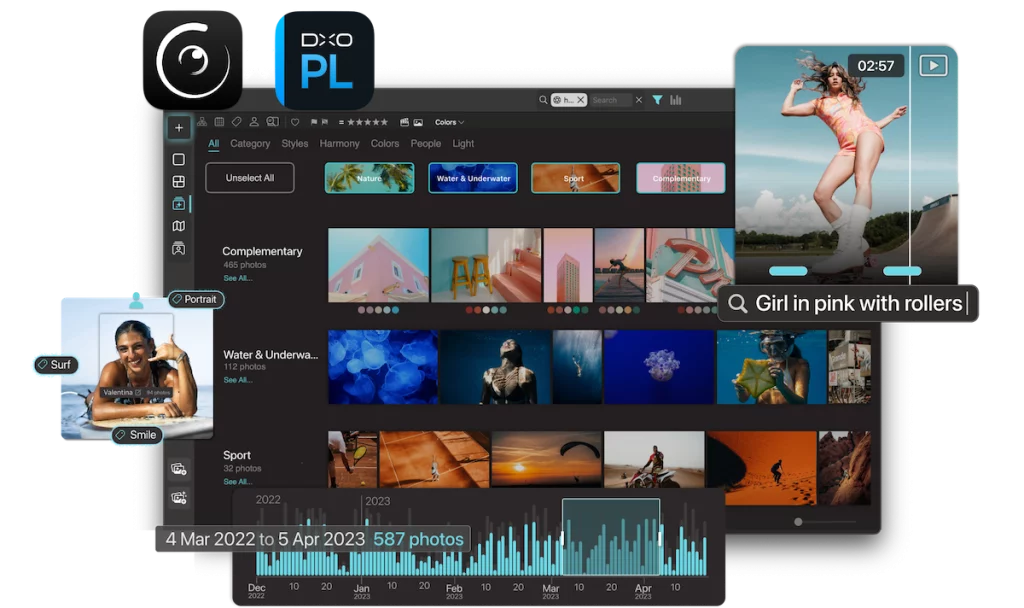
Gather all your images and videos: Peakto’s AI helps you find and annotate them in batches within seconds.

Insightful Perspectives to Highlight Your Best Creations

Unlock truly unique views on your media, allowing you to analyze your work and uncover hidden treasures.

Boost Your Workflow With Centralized Actions

Peakto gives you centralized control over your media and ensures it’s accessible anytime, anywhere.

Peakto now compatible with DxO PhotoLab 8

Peakto is the perfect photo manager for DxO PhotoLab 8. Explore your images with Timeline and Map views, use facial recognition, prompt-based search, and create smart albums. It integrates seamlessly with DxO PhotoLab and also works with various sources like folders, Apple Photos, Lightroom, Luminar, Pixelmator, and more.

A Bridge Between Your Favorite Photo Apps

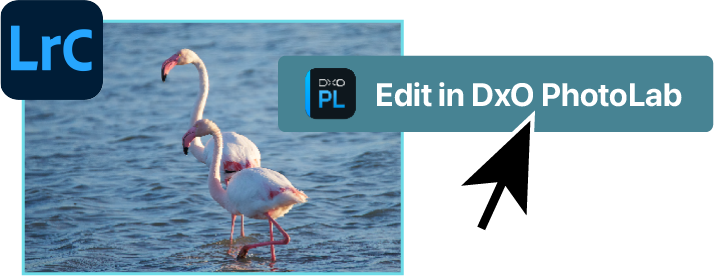
Peakto turns PhotoLab into a powerful editing plugin for all your images. It doesn’t matter if your images are organized in Capture One, Apple Photos, Luminar, or Lightroom, Peakto creates a bridge for these apps to communicate.

Peakto Can Trigger DxO PureRAW Conversions

From any RAW file and preserve the link with the original file. You can then edit your new RAW file in your favorite editing software or even in Apple Photos.

A Unique Editing Workflow Made Possible

If you’ve switched from Lightroom to DXO PhotoLab, Peakto can help fill the gap by providing cataloging features and visual access to your former Lightroom catalogs. You can edit any photo in DXO PhotoLab directly from Peakto.

Our customers love it

Discover what users say about us.

Testimonial of JF Barré for CYME

J-F Barré

Dream come true ! Visualize and find easily your images wherever they are, catalogs, files, external supports, it is now possible with Peakto. It’s impressive and indispensable. Beware, Peakto is addictive! What’s more, it’s user-friendly and aesthetically beautiful.

Testimonial of Martin Eliott for CYME

Martin Elliott

I’ve purchased an annual subscription and am delighted! I have added some old Aperture catalogs and I use the faces I had defined in there to find the photos and then Peakto shows me the same ones in Capture One (which of course does not do facial recognition) so I haven’t lost my old face definitions! Fantastic! Thanks so much!!!
Testimonial of Christopher Werby for CYME

Christopher Werbt

Peakto is an incredible product. It far exceeds the features of other image catalogues that I’ve used, and I’ve used plenty over the years. I particularly like Peakto’s approach of not trying to do everything, not moving my image files, and allowing me to edit the masters in the programs of my choosing.
Testimonial of Paul Clark for CYME

Paul Clarke

Peakto is different. Finally an application that allows me to manage all of my 350,000 photos in one place. Previously spread across years of multiple Aperture and Lightroom libraries, now consolidated in one single app. The dev team actively responds with request and questions, often surprising me with better solutions than I was looking for.

Need to try Peakto?

Enjoy Peakto for free for 7 days.
Try it now !

Discover Peakto in a Short Video

Fell in love with the best AI photo
manager ever.

All your photos and videos in one place

Gain new perspectives on all your medias to fuel creativity.

With AI-powered features

Local AI analysis to protect your privacy.

Automatic Tagging with AI

Never lose an asset again thanks to automatic labels powered by AI.

AI Keywording - Peakto Feature

Search for Faces

Identify and annotate a person through stacks of photos in seconds.
Faces Stacks - Peakto Feature

Just ask to find the right image or video

Just ask to find your photos and videos – no keywording required. Our AI automatically identifies the content of your assets.

Search for Similar Photos

Finding inspiration or truly identical content is much simpler when you can search from a given image.

Spotlight Your Best Photos

Your portfolio is analyzed to provide detailed insights. The AI assigns aesthetic, technical, and colorfulness scores to your photos.

Color Harmony & AI Score - Peakto Feature

Create Multi-Catalog Collections

Seamlessly craft albums from various sources such as different folders, catalogs, sessions, and libraries.

Local AI analysis

No Extra Copies

Offline Access

Always synchronized

Always accessible

DISCOVER OUR OTHER PRODUCTS

Logo del plugin Peakto Search

Peakto Search

Plugin for Lightroom or Capture One

Logo du logiciel Avalanche - Migration de bibliothèques photo

Avalanche

Photo Libraries Migration

Logo de l'application Findmysnap - Moteur de recherche d'images

FindMySnap

Photo Search Engine

Frequently asked questions

Explore Peakto in video

Watch our demo video, then sign up for a live FAQ session to connect with our team.
How to Organize Your Photos Using Keywords 01
Hey, wait...
Inspiration, Tips, and Secret Deals — No Spam, Just the Good Stuff