Shade just raised $20M. But its custom pricing, cloud dependency, and team-first design leave a lot of creators and small studios out in the cold.
Here are the 5 alternatives that actually fit your workflow.
In Summary
Shade is an AI-powered cloud NAS platform for creative teams — combining hybrid storage, natural language search, and real-time collaborative review. If you’re looking for a Shade alternative, the right choice depends on your workflow and team structure:
- Peakto — best for creators managing large local archives (local-first, privacy-first, Mac)
- LucidLink — best for video teams needing instant access to large files without downloading
- iconik — best for teams needing a full hybrid MAM/DAM with AI tagging and transcription
- Frame.io — best for video review, approval, and Camera to Cloud workflows
- Air — best for marketing/creative teams managing brand assets and visual content
Quick Comparison Table
| Tool | Best For | Storage Model | Platform | AI Features | Team Collaboration | Starting Price |
|---|---|---|---|---|---|---|
| Peakto | Creators with large local archives | Local / on-prem | Mac only | ✅ AI search, auto-tagging, transcription | ✅ Yes| $10/mo or $270 lifetime |
|
| LucidLink | Video teams accessing large files remotely | Cloud streaming | Mac, Win, Linux | ❌ No AI tagging | ✅ Yes | $7/member/mo |
| iconik | Teams needing full hybrid MAM/DAM | Cloud + on-prem | Web (any OS) | ✅ Visual tagging + transcription | ✅ Yes | Pay-as-you-go |
| Frame.io | Video review & approval workflows | Cloud | Web (any OS) | ✅ Transcription + C2C | ✅ Yes | Free / $15/member/mo |
| Air | Marketing & brand asset management | Cloud | Web (any OS) | ✅ Search by color, face, object | ✅ Yes | ~$10/user/mo |
| Shade (reference) | Creative teams, hybrid storage + AI search | Cloud hybrid | Mac, Win | ✅ Natural language search | ✅ Yes | Custom pricing |
What Is Shade — and Why Look for an Alternative?
Shade is an AI-powered cloud NAS platform designed for creative teams managing large volumes of media. It combines hybrid storage (cloud + local NAS), AI-powered natural language search, real-time collaborative review, and automated metadata tagging — all in a single system.
Key Shade features include:
- AI search across RAW images, video, and audio using natural language queries
- Hybrid storage — cloud-hosted drives that mount locally like a traditional hard drive
- Review & approval workflows with client collections and sharing permissions
- SOC II Type 2, ISO 27001, HIPAA, and GDPR compliance for enterprise security
Shade is a strong fit for video production studios, post-production teams, and creative agencies managing terabytes of mixed media. Its limitations: pricing is custom (no transparent public plans), it is cloud-dependent, and it is primarily built for teams — not individual photographers or small studios on a budget.
Top 5 Shade Alternatives
1. Peakto — Best Local-First Alternative (Privacy-First)
Platform: Mac only
Pricing: From $10/month | $270 lifetime license | 7-day free trial
Best for: Photographers and videographers indexing large archives stored locally, on external drives, or on a NAS — without uploading to the cloud
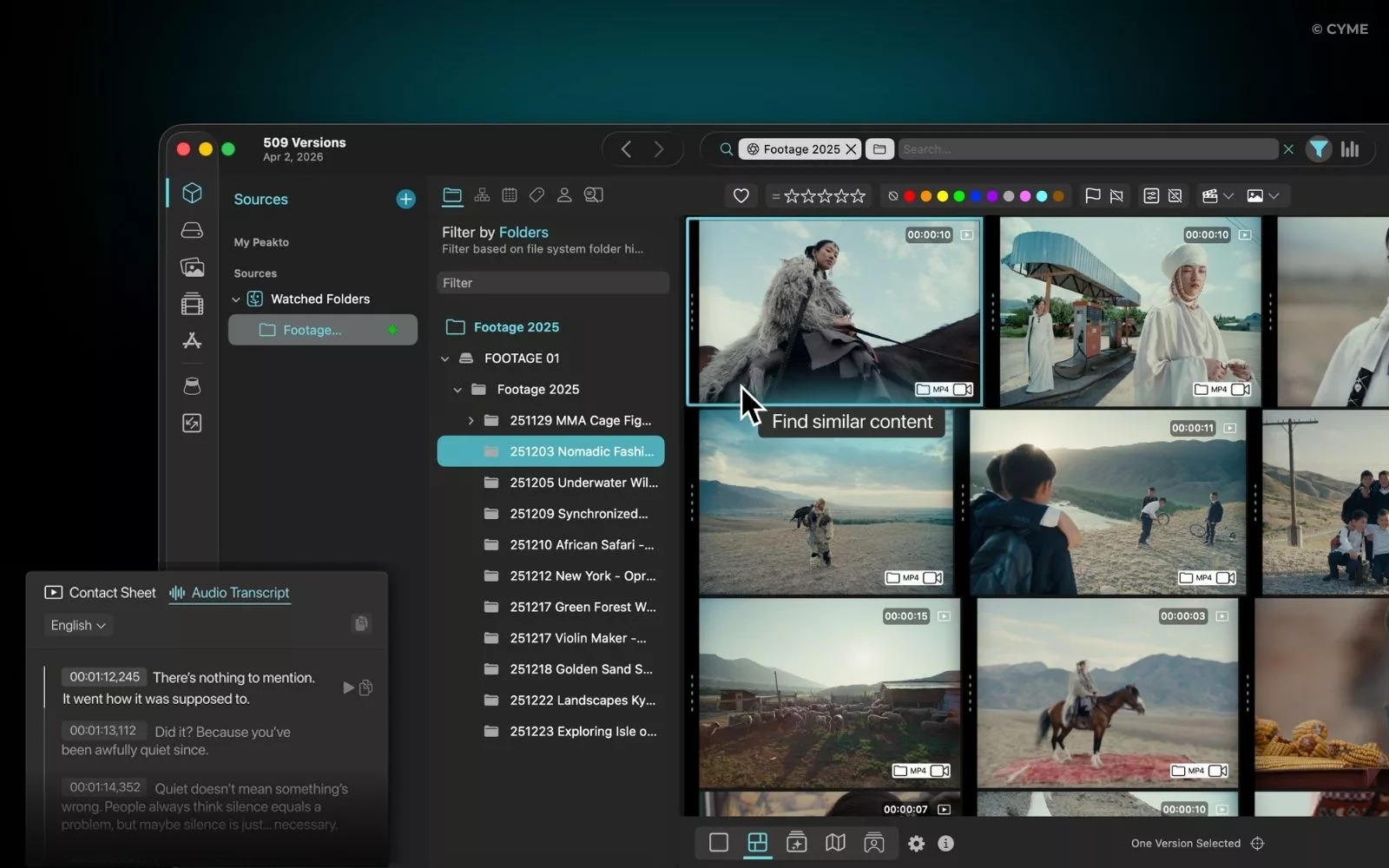
Peakto is the local-first answer to Shade. Where Shade requires your media to live in its cloud infrastructure, Peakto indexes everything where it already is — Lightroom catalogs, Capture One sessions, Apple Photos, NAS drives — and gives you AI-powered natural language search across your entire archive, privately.
Peakto also adds ShareSpaces for sharing collections, validation statuses, and synchronized annotations — making it a credible local DAM for photographers who don’t want to depend on cloud storage.
Key features:
- AI-powered search across your full local archive
- Indexes photo catalogs, NAS, drives, video RAW formats and more
- ShareSpaces, validation statuses, and synchronized annotations
- Zero upload required — your files stay on your drives
- Lifetime license available
Pros
- Subclips, markers, and bins creation for faster pre-editing
- Culling and deduplication tools built into the software
- Advanced AI search across your entire media archive
- Supports legacy software (Aperture, iView Media) — no migration needed
- Lifetime license available (no ongoing subscription required)
- Product of the Year at NAB Show 2025
Cons
- Mac only (no Windows version)
- 7-day trial only available with subscription plans
- Steeper learning curve for photographers new to library-level workflows
2. LucidLink — Best for Cloud Drive / File Streaming
Platform: Mac, Windows, Linux
Pricing: From $7/member/month (Starter) | $32/member/month (Business) | 30-day free trial
Best for: Video teams who need to access and edit large files (4K, RAW, ARRI) from anywhere, as if they were on a local drive
LucidLink is the closest alternative to Shade’s core infrastructure promise: a cloud drive that mounts locally and streams files on demand. It’s less a DAM and more a collaborative cloud filesystem — ideal for distributed post-production teams who need one source of truth without waiting for downloads.
Key features:
- File streaming — open and edit large files directly from the cloud
- Zero-knowledge encryption for security
- Works with Adobe Creative Cloud, Final Cut Pro, Figma, and more
- Shared filespace mounts like a local drive on any OS
- Snapshot-based versioning and recovery
Pros
- Closest to Shade’s hybrid storage model
- No download required
- Strong security
Cons
- Not a DAM — no AI tagging or metadata management
- Requires fast internet for large files
3. iconik — Best Hybrid MAM/DAM
Platform: Web-based (any OS)
Pricing: Pay-as-you-go (credits model) | Fixed annual plans available | Free trial (no credit card required)
Best for: Media teams needing a complete hybrid MAM/DAM with AI tagging, transcription, and multi-storage support
iconik is the most complete alternative to Shade for teams managing mixed media at scale. It combines DAM and MAM capabilities in a single platform — with AI visual tagging, speech-to-text transcription for searchable dialogue, hybrid storage (cloud + on-prem), and deep Adobe Creative Cloud integration.
Unlike Shade, iconik uses a bring-your-own-storage model — you keep your files on AWS, Azure, Google Cloud, or on-prem, and iconik manages the metadata and workflows on top.
Key features:
- AI visual tagging and speech transcription (search by spoken words)
- Hybrid storage: cloud, on-prem, or both via storage gateway
- Real-time review with time-based comments and annotations
- Adobe Premiere Pro, Photoshop, After Effects panel integration
- Pay only for active users — no charge for inactive months
Pros
- True MAM/DAM hybrid
- Bring-your-own-storage
- No vendor lock-in
Cons
- Learning curve for non-technical teams
- Credit-based pricing can be hard to predict
4. Frame.io — Best for Video Review and Approval
Platform: Web-based (any OS)
Pricing: Free (2 members, 2GB) | Pro $15/member/month | Team $25/member/month | Enterprise custom
Best for: Video production teams needing fast review cycles, client approvals, and Camera to Cloud workflows
Frame.io (Adobe) is the industry standard for video review and approval. Its Camera to Cloud feature lets footage upload instantly from set the moment a take is done — so editors and directors can review material in real time, anywhere in the world.
It’s less of a full DAM than Shade, but for teams whose main pain point is review, feedback, and approval, Frame.io is unmatched. With Frame.io Drive, media can also be accessed without downloading — bringing it closer to Shade’s storage promise.
Key features:
- Camera to Cloud — instant upload from set to cloud
- Frame-accurate comments and annotations directly on video
- Version stacks and comparison viewer
- Integrates with Adobe Premiere Pro, Final Cut Pro, DaVinci Resolve
- Transcription and captions on all plans
Pros
- Industry standard for video review
- Camera to Cloud is unique
- Generous free plan
Cons
- Not a full DAM — limited metadata and asset organization
- Storage costs add up at scale
5. Air — Best for Creative Operations and Marketing Assets
Platform: Web-based (any OS)
Pricing: From ~$10/user/month | Free trial available
Best for: Marketing and brand content teams organizing, approving, and activating creative assets
Air is a visually focused creative operations platform — strong on organizing, approving, and distributing brand assets. It’s less oriented toward heavy post-production than Shade or LucidLink, but excels at visual organization and marketing asset activation: search by color, objects, faces, and dialogue, with version stacking keeping all iterations in one place.
Key features:
- AI search by color, objects, faces, and dialogue
- Version stacking — all iterations in one place
- Visual workspace for creative workflow management
- Approval workflows and client sharing
Pros
- Clean visual interface
- Affordable entry price
- Strong for brand/marketing teams
Cons
- Less suited to heavy video post-production
- Limited advanced metadata tools
How to Choose the Right Shade Alternative
You’re a photographer or videographer managing a large local archive: Choose Peakto. It’s the only tool on this list that indexes your full archive locally — across Lightroom, Capture One, Apple Photos, NAS drives — without uploading anything to the cloud. For a deeper look, see our guide to photo management software.
Your team works with large video files and needs instant remote access: Choose LucidLink. Its file streaming model is the closest to Shade’s hybrid storage promise — files mount like a local drive, no download required. See also our breakdown of cloud-based vs local photo management.
You need a full MAM/DAM with AI tagging, transcription, and hybrid storage: Choose iconik. It’s the most complete platform on this list for teams managing mixed media at scale, with bring-your-own-storage flexibility. Our DAM vs MAM guide can help you decide which category fits your workflow.
Your main need is video review, client approval, and Camera to Cloud: Choose Frame.io. It’s the industry standard for video feedback workflows, with the most accessible pricing on this list.
You’re a marketing or brand content team: Choose Air. Its visual-first interface and approval workflows are built for creative ops teams managing brand assets — not heavy post-production. For broader context, see our comparison of digital asset management software.