Do you really own your photos if they are stored in the cloud? Or are they safer when kept on your personal device?
As photographers, our work is not just about capturing stunning images, but also about managing them effectively. Whether you are a professional handling thousands of RAW files or a photography enthusiast archiving personal memories, photo organizing software is essential for maintaining an efficient workflow.
The big question is: should you choose cloud-based photo management software or a local solution? Each option comes with its own advantages and drawbacks. Cloud storage relies on remote servers for storage and management, offering flexibility but requiring an internet connection. Local software, on the other hand, keeps everything on your device, ensuring full control but limiting accessibility.
In this guide, we will take a closer look at the pros and cons of each solution to help you decide which one is best suited to your photography workflow.
Cloud-Based Photo Management Software

Advantages of Cloud-Based Solutions
1. Remote accessibility
Categorizing and tagging help you stay organized, allowing you to save valuable time. Instead of endlessly scrolling through a disorganized library, you can quickly locate the specific photos you need with ease.
2. Automatic backups and syncing
Cloud solutions ensure your photos are backed up automatically, minimizing the risk of data loss due to device failure or accidental deletion. Services like Adobe Creative Cloud, Google Photos, and Dropbox not only sync images across devices but also offer version history and file recovery options, allowing photographers to revert to previous edits if needed. Additionally, these platforms often use advanced encryption techniques to enhance security and protect sensitive data.
3. Collaborative features
If you work with a team or need to share images with clients, cloud-based software allows seamless collaboration. Platforms like SmugMug and Google Drive enable multiple users to access, edit, and comment on shared albums in real-time. This real-time editing feature enhances workflow efficiency and ensures that feedback is integrated without delays.
4. AI-powered organization and tagging
Many cloud-based tools use machine learning for photographs, offering automated photo tagging and photo characterization. These AI-driven features can recognize faces, detect objects, and categorize images based on content, making it easier to locate specific photos within vast libraries. Some tools even enhance metadata management, automatically filling in missing details like location, time, and subject matter.
5. Scalability
Disadvantages of Cloud-Based Solutions
1. Dependency on internet connectivity
2. Potential privacy and security concerns
While cloud providers offer secure photo backups, they remain susceptible to data breaches and cyber threats. If you handle sensitive client photos or proprietary images, ensuring strict security measures—such as encryption, two-factor authentication, and zero-knowledge cloud services—is crucial to safeguarding your assets. Additionally, some cloud storage providers may have terms of service that grant them limited rights over stored content, which is an important factor to consider.
3. Recurring subscription costs
Local Photo Management Software

Local photo management software stores all your images directly on your computer or external drives, ensuring complete control over your data. They often provide superior performance for editing and organizing large photo libraries, allowing faster access to RAW files without the need for constant uploads and downloads. Additionally, local software solutions enable users to maintain their preferred file structures and metadata without concerns over potential cloud storage limitations or restrictions.
Advantages of Local Solutions
Local photo management solutions provide complete control over your image library, ensuring that your photos remain accessible and secure without reliance on an internet connection. These tools are ideal for photographers who prioritize speed, privacy, and independence from cloud-based subscriptions.
1. Full control over data
With local storage, you own your photos completely—no third-party access, no risk of cloud outages, and no dependency on external service providers. Secure photo management is in your hands, giving you full authority over how your files are stored, organized, and accessed. This level of control is particularly beneficial for professional photographers handling sensitive client work or large volumes of RAW files.
2. Faster access and processing
3. One-time purchase cost
4. Offline accessibility
Local solutions function independently of an internet connection, making them essential for photographers who work in remote locations, travel frequently, or operate in areas with unreliable connectivity. This ensures that images are always accessible, regardless of external network conditions, enabling seamless workflow continuity.
Disadvantages of Local Solutions
1. Limited remote access
If you need to access your photos while traveling, a local-only setup can be restrictive. Unlike cloud-based options, local storage does not offer automatic synchronization across devices. However, some hybrid solutions allow remote access to local libraries when properly configured, offering a balance between control and flexibility.
2. Manual backups required
Unlike cloud solutions that provide continuous automated backups, local storage relies on manual backup methods. This means photographers must implement photo backup solutions such as external drives, NAS systems, or RAID configurations to ensure their data is protected against loss. Regular backup schedules and redundant storage are essential best practices.
3. Hardware failure risks
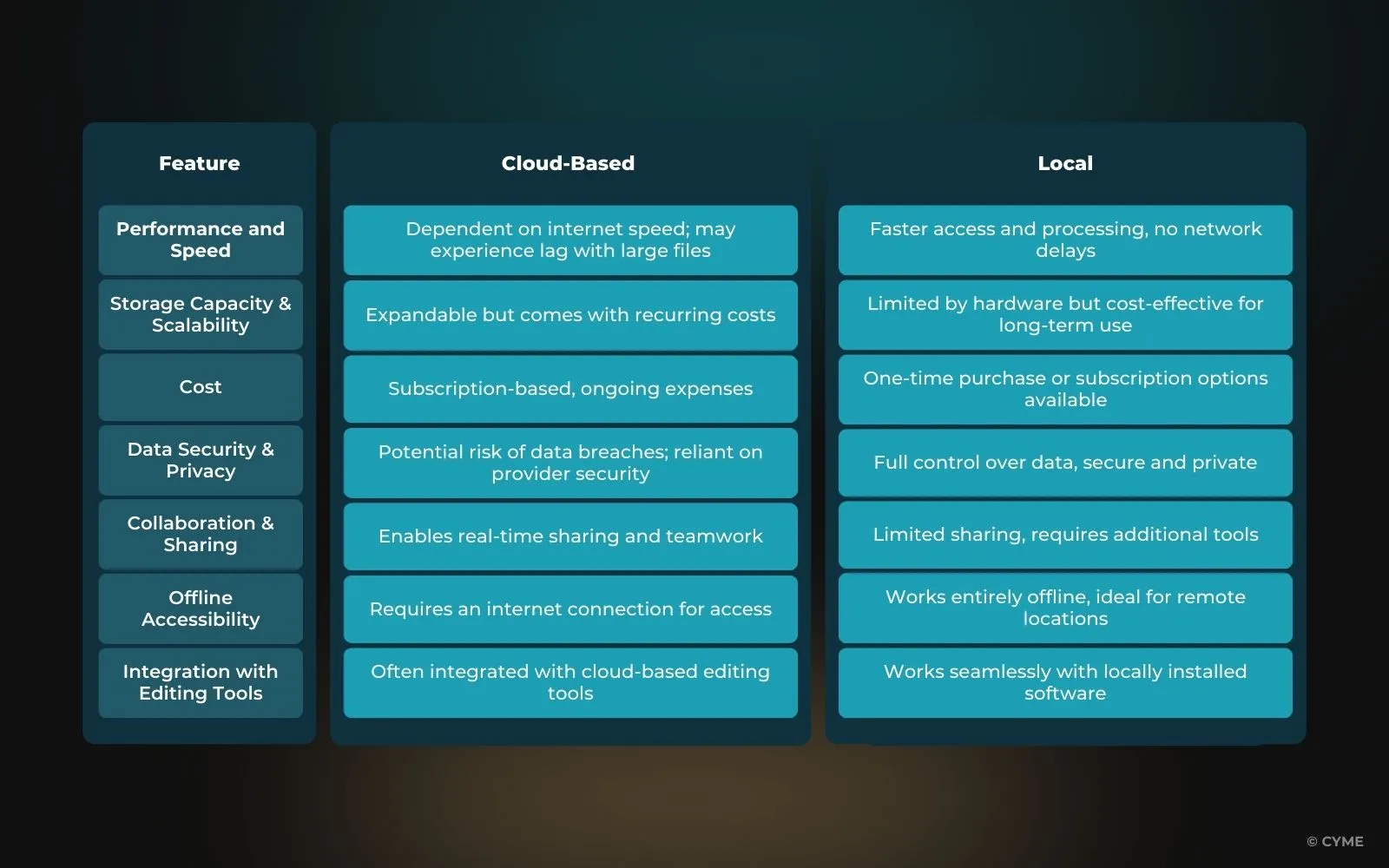
Comparing Cloud-Based and Local Solutions
To make an informed choice, let’s compare the key factors that differentiate cloud-based and local photo management solutions:
Hybrid Approaches: Combining Cloud and Local Solutions
For photographers who want the best of both worlds, a hybrid approach offers flexibility and security. By combining cloud and local storage, users get remote access while keeping control over their core image library. Using photo organizing software to simplify workflow streamlines image management, making it easy to categorize, access, and maintain security, all while boosting efficiency.
Benefits of a Hybrid Approach

A hybrid workflow allows photographers to store high-resolution RAW files locally while using the cloud for previews and sharing. This ensures that large files can be edited efficiently without relying on internet speeds while still enabling easy access and collaboration.
By maintaining a secure local archive, photographers can leverage cloud-based AI-powered tagging and search functionalities, improving organization without compromising privacy.
Synchronizing select folders between cloud and local storage also enables seamless access to frequently used files across multiple devices, making it a practical solution for both personal projects and client work.

Strategies for Implementing a Hybrid Workflow
Implementing a hybrid workflow involves structuring data storage strategically. Local storage can be used for primary backups, ensuring that photographers have a secure, high-performance environment for editing and archiving. Cloud storage can serve as a secondary redundancy, preventing data loss in case of hardware failure.
Active projects can be synchronized with the cloud while completed projects are stored locally, optimizing both accessibility and storage management. Additionally, leveraging AI-powered organization tools in cloud-based systems can enhance metadata management while still preserving a local master archive for long-term security.
While Peakto is fundamentally focused on local storage, it integrates with cloud services for added flexibility. Features such as syncing libraries or enabling cloud backups provide photographers with hybrid functionality that enhances their workflow without compromising the core benefits of local storage.
Decision-Making Framework

The choice between cloud-based, local, or hybrid solutions depends on individual needs and working styles.
Cloud-based solutions are ideal for photographers who work internationally or frequently collaborate with teams. For instance, when traveling abroad, having remote access to a cloud library allows for efficient editing and sharing, but it is crucial to consider data security risks associated with cloud storage.
Local solutions are better suited for photographers handling sensitive client data, as they provide complete control over privacy. A local setup ensures security while still allowing remote consultation when needed, as with Peakto’s ability to provide access without fully migrating files to the cloud.
Hybrid solutions work best for photographers managing a variety of projects, whether personal or client-based. This approach offers the advantage of both security and accessibility, making it an attractive option for professionals looking to provide flexible services.
Choosing the Right Solution for Your Photo Management Workflow
The choice between cloud-based and local solutions depends on the photographer’s workflow, security needs, and accessibility preferences.
Cloud-based options offer accessibility, automation, and scalability, while local solutions provide privacy, speed, and control. A hybrid approach often makes it possible to combine the best of both worlds, creating a balance between security and convenience. To go further and compare real tools, you can also explore our guide to the best photo organizer software for Mac.
Ultimately, the best photo storage and organization solution is the one that matches your workflow, your budget, and your data security priorities. Carefully evaluating your needs will help you choose a system that improves your efficiency and enhances the long-term management of your photo library.
Still deciding which approach is right for you? Check out our guide on how to choose photo management software for a comprehensive evaluation framework.