


You Don’t Lose Time Deleting Photos — You Lose It Hesitating
Scrolling through nearly identical shots. Stopping on the same images again and again. Wondering if you might need them someday.
For many creators looking for advice to organize photos and videos, this hesitation is the real bottleneck. The issue isn’t storage size or file count—it’s uncertainty. Adobe’s Creative Trends Report shows that creators now spend more time managing media than creating, largely because sorting and deletion decisions are postponed.
This is precisely the gap tools like Peakto are designed to address—not by forcing deletion, but by restoring clarity. By unifying all photos and videos across folders, drives, and catalogs into a single visual index, Peakto helps creators see their entire library at once and make decisions earlier, while context is still fresh.
Effective photo organization doesn’t start with deleting files. It starts with seeing clearly.
Whether you’re trying to reduce clutter, find the fastest way to rank photos on a Mac, or simply regain control over years of accumulated images, the principles below apply.
Quick Answer — How to Stop Wasting Time Deleting Photos
- Delete clearly unusable shots immediately
- Select favorites instead of deleting everything else
- Group similar images before ranking
- Use AI to reduce repetition—not to decide for you
Decide Early: Why Clarity Beats Deletion
The most time-consuming part of photo cleanup isn’t clicking “Delete.” It’s deciding whether to delete. When images are scattered across multiple folders, apps, and drives, creators are forced to rediscover the same photos again and again. This fragmentation turns every review into a memory test.
A centralized view of your library—whether through careful structure or a tool like Peakto—removes that friction. Seeing all images together makes it easier to judge relevance, quality, and redundancy before hesitation sets in.
This approach is one of the fastest ways to rank photos on a Mac, because ranking depends more on clarity than speed.
Delete on the Go: Remove Poor Shots While the Moment Is Fresh
The easiest photos to delete are the ones you still remember taking. Right after shooting, unusable images are usually obvious:
- Missed focus
- Motion blur
- Accidental clicks
- Incorrect exposure
Deleting them immediately on your camera, in Apple Photos on iPhone or during import on macOS prevents clutter before it forms. Early deletion dramatically reduces the number of images you’ll need to review later—whether in Finder, Photos, or a centralized browser. A simple rule to reduce decision fatigue :
Delete immediately if the photo is clearly unusable and keep temporarily if you hesitate. Early decisions compound into major time savings.
Select What You Keep Instead of Deleting Everything Else
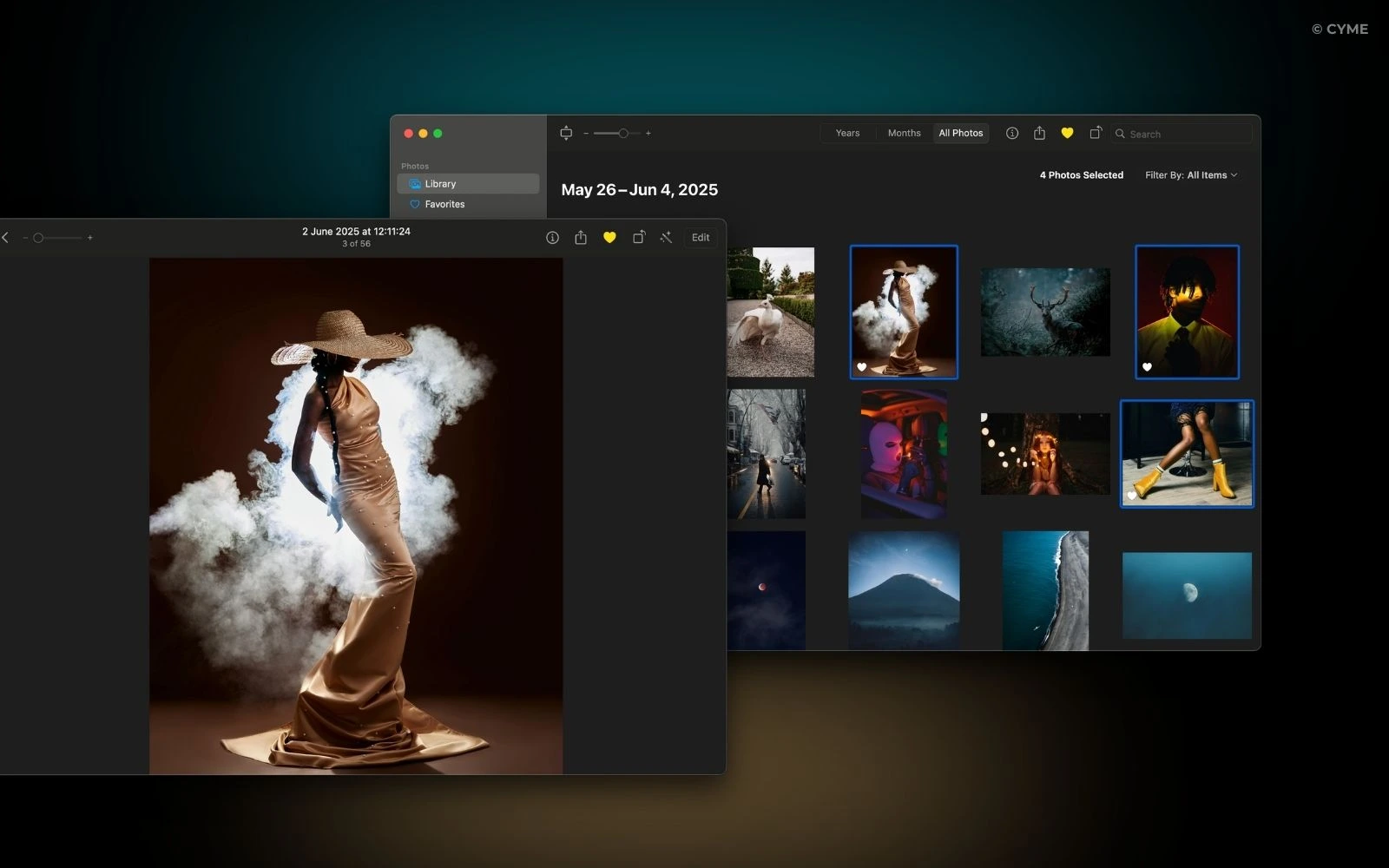
Deleting feels slow because it forces you to justify every removal. Selecting what you keep flips that mental effort. Using:
- The Favorite icon in Apple Photos
- Star ratings or color tags on macOS
- Selections inside tools like Peakto creates a curated subset of images worth revisiting.
This method is widely considered one of the best way to declutter and organize your digital photos, because it shifts your attention from your entire archive to your strongest work.
Once favorites are clearly marked ranking becomes faster re-reviewing becomes unnecessary deleting becomes optional.
Group Similar Photos to Avoid Repeating the Same Decision
One of the biggest time drains in photo cleanup is repetition. Bursts, brackets, and reshoots create clusters of nearly identical images. Reviewing them one by one—especially weeks or months later—forces you to repeat the same decision multiple times. Grouping similar images first allows you to:
- Compare once
- Decide once
- Move on
Whether done manually or through AI-powered similarity detection, grouping is one of the best ways to view and explore your images without losing visual context.
Professional photographers often keep only 10–15% of their original captures after culling. Grouping makes that selection process faster and calmer.
Short, Regular Reviews Beat Massive Cleanups
Large deletion sessions feel overwhelming because they compress hundreds of decisions into one moment. Short, regular reviews work better. Spending 5 minutes after a shoot or 10 minutes once a week keeps your library manageable by design.
When you wonder how to find all the photos stored on your Mac, well-structured libraries also make it much easier, since images remain connected to projects, dates, and selections instead of disappearing into forgotten folders.
This incremental approach is a core principle of professional digital asset management.
Let AI Reduce Repetition—Not Make Decisions for You
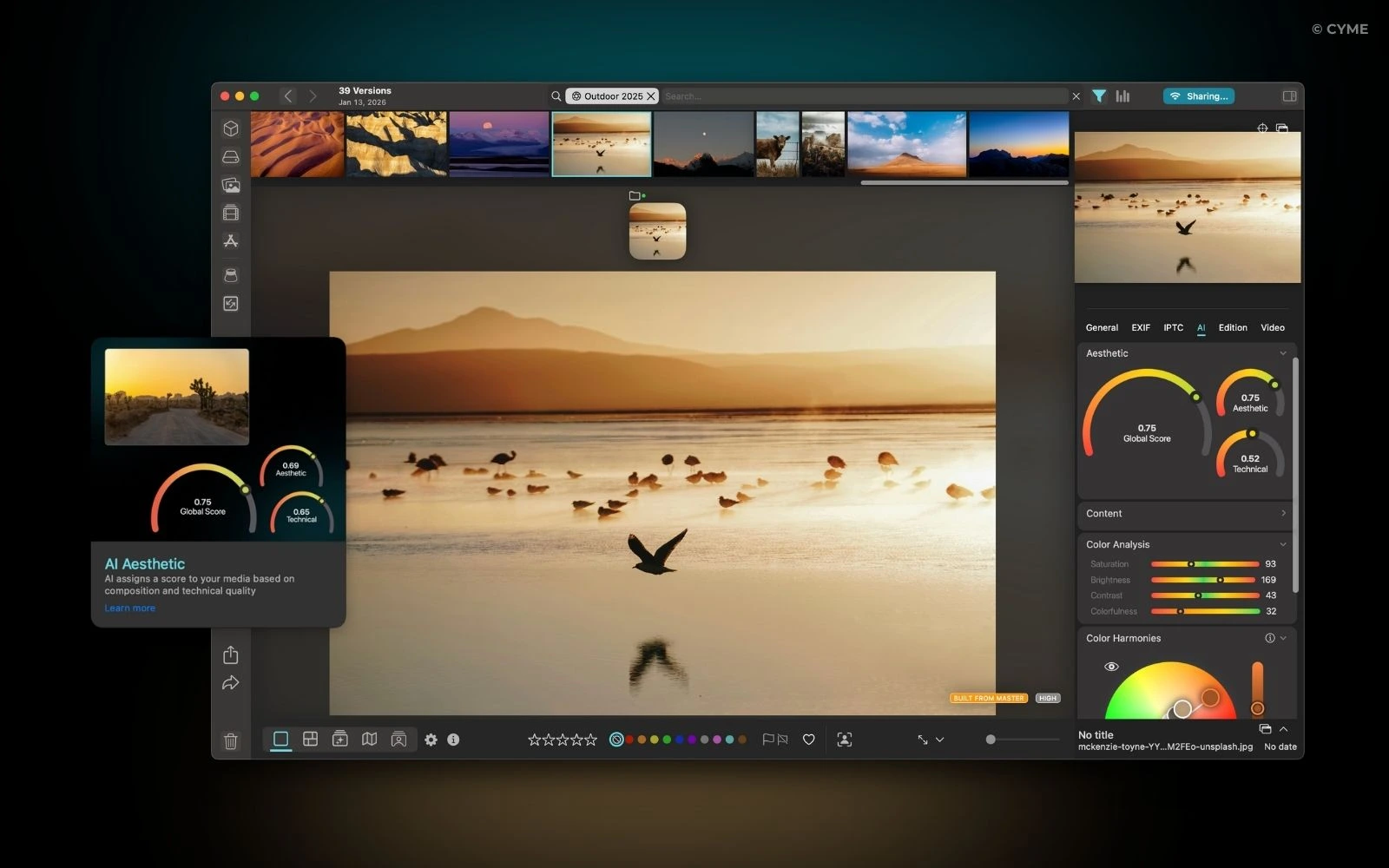
Sometimes early deletion isn’t realistic and this is where AI-assisted tools like Peakto, our photo organizer, help—not by replacing judgment, but by reducing repetition. Peakto’s aesthetic analysis reviews entire folders or libraries and highlights the strongest images based on:
- Sharpness
- Exposure
- Composition
All analysis runs locally, without cloud-based generative AI. Instead of manually comparing dozens of near-identical photos, creators immediately see the most promising candidates and decide with confidence. We respect the way you safely store your photos.
This reflects a broader trend in modern photo management: AI narrows the field so humans can decide calmly.
Decide Earlier. Create More.
Avoiding time-consuming photo deletion isn’t about being strict—it’s about being intentional.
When you see your entire library clearly, remove poor shots early, select your best images, and review regularly, your archive stays manageable by design. And when volume grows faster than your time, tools like Peakto help you step back, recognize patterns, and decide with clarity.
Next time you import photos, don’t ask “What should I delete?” Ask “Which images deserve my attention?”. Over time, that shift frees up space—not only on your drive, but in your creative process.